 XSCamera
 help
How XSCamera works and how to get the most from it, from the team that makes it.
XSCamera records video in an Android foreground service, so it continues with the screen off or other apps open. Tap Start Camera to record, stop from the notification or the preview, and find videos under Records. For reliable long recordings set battery use to Unrestricted.
How does XSCamera work?
When you tap Start Camera, XSCamera starts a foreground service that owns the camera. Because the service, not the visible screen, is recording, you can lock the phone or switch apps. Android shows a notification for the service and, on Android 12+, a green camera indicator.
Settings explained
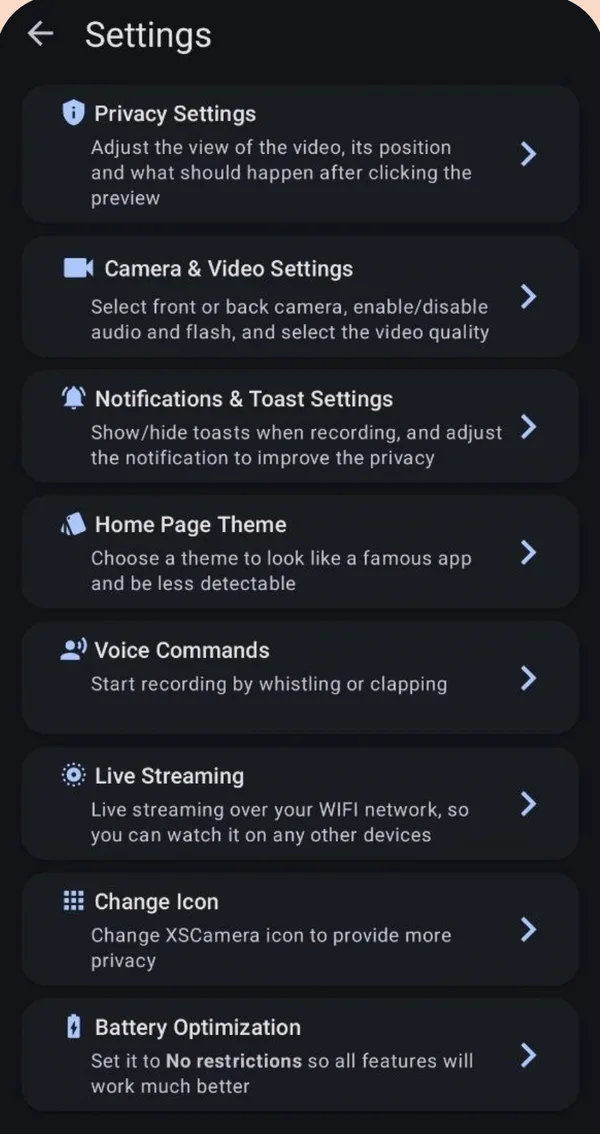
| Setting | What it does |
|---|---|
| Privacy Settings | Privacy Mode (mini preview, app icon, red dot, nothing), preview size and position, what a tap on the preview does, Save to Gallery, Lock Screen passcode |
| Camera & Video Settings | Front/back camera, audio, flash, auto focus, quality (SD–UHD), codec (H.264/H.265), bitrate (Recommended/Maximum), frame rate, orientation, timestamp, zoom |
| Notifications & Toast | Show or hide in-app toasts and choose the notification icon |
| Home Page Theme | Changes the look of the home screen |
| Voice Commands | Start recording by whistle or clap |
| Live Streaming | Local RTSP stream, quality and port |
| Change Icon | Alternative launcher icons |
| Battery Optimization | Shortcut to set the app to No restrictions |
Where are XSCamera videos saved?
Recordings appear in the app under Records. With Save to Gallery on (Privacy Settings), they are also saved to the phone’s Movies folder and show up in your gallery and file manager. With it off, they stay inside the app’s own storage. From Records you can play, share or delete each video. Deleting in the app also removes the gallery copy.
How to record longer
- Switch Video Quality to HD (720p) or the codec to H.265. Each roughly halves file size.
- Use Recommended bitrate rather than Maximum.
- Use 30 FPS rather than 60. For night scenes, 15–30 FPS gives a brighter image.
- Turn off audio if you do not need it.
- Keep the phone on a charger and out of the sun.
The Storage panel on the home screen shows the estimated recording time for your current settings.
Scheduled recordings
Home → Schedulers → Add Scheduler. Choose the date, start time and duration in minutes. Schedules cannot overlap. On Android 12 and newer allow Alarms & reminders so recording starts at the exact time, and set battery use to Unrestricted so the phone does not delay it.
Start by whistle or clap
Settings → Voice Commands. Choose Whistle or Clap and tap Start Listening. XSCamera listens until it hears the sound, then starts recording. Keep the screen unlocked while it is listening, because another app can take over the microphone on a locked phone.
Start without opening the app
Long-press the XSCamera icon on your home screen for start and stop shortcuts.
Live streaming
Settings → Live Streaming → Start Streaming. Open the shown rtsp:// address in VLC or another RTSP viewer on the same Wi-Fi. Step-by-step.
App lock
Privacy Settings → Lock Screen. Set a 4-digit passcode that is asked each time the app is opened.
Free and Premium
| Free | Premium · $4.99/month | |
|---|---|---|
| All recording features | Yes | Yes |
| Ads | Yes | None |
| Cloud backup | — | 60 GB |
Subscriptions are managed in Google Play → Payments & subscriptions.
Troubleshooting
- Recording stops after a few minutes: battery optimization. Fix for your brand.
- No sound: turn on Record Audio and allow the microphone permission.
- No preview over other apps: allow “Display over other apps”.
- Schedule did not start: allow Alarms & reminders and set battery to Unrestricted.
- Deleted a video by mistake: XSCamera has no recycle bin. If Save to Gallery was on, check your gallery app’s trash, which usually keeps items for 30 days.
Download and updates
Install and update XSCamera only from Google Play. We do not publish APK files on other sites, and copies found there may be modified.
Questions people ask
How does XSCamera work?
It records with an Android foreground service, so video continues when the screen is off or another app is open. A notification is shown while it records.
Where is the XSCamera folder or file location?
In-app under Records. With Save to Gallery enabled, files are also in the phone’s Movies folder.
Is there an XSCamera app for iPhone?
No. XSCamera is Android only.
Where can I download the XSCamera APK?
Use Google Play. XS Labs does not distribute APK files elsewhere.
How do I cancel XSCamera Premium?
Open Google Play → profile → Payments & subscriptions → Subscriptions → XSCamera → Cancel.
What Android version does XSCamera need?
Android 7.0 (Nougat) or newer.