 XSCamera
How to record video while using other apps
Android’s camera stops when you leave it. Here is how to keep filming while you use maps, messages, a browser or anything else.
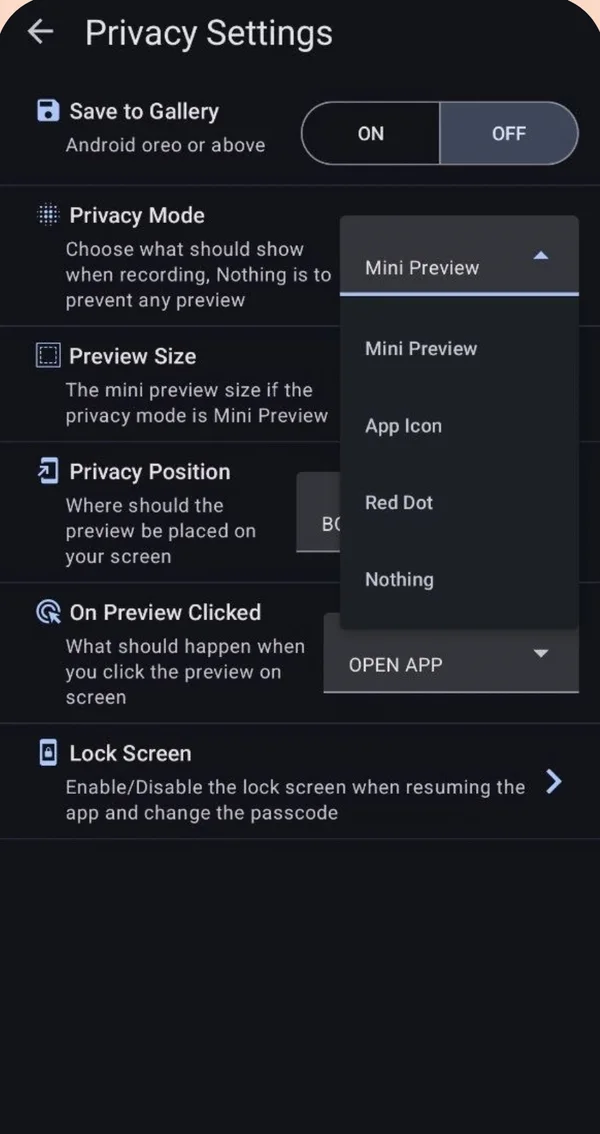
Use a background video recorder. Start recording in XSCamera, then press Home and open any other app. The camera keeps recording through a foreground service. A small preview, an icon or a red dot can float over the other app, or you can show nothing.
How it works
Normal camera apps hold the camera only while they are on screen. XSCamera moves the camera into a foreground service, so the recording is independent of whichever app you are looking at. Android shows a notification and, on Android 12+, a green dot while this happens.
Steps
- Open XSCamera and choose a preview mode
Settings → Privacy Settings → Privacy Mode. Mini Preview floats a small live view over other apps, App Icon and Red Dot are smaller, Nothing leaves the screen clear. - Allow “display over other apps”
Needed for the floating preview. Android asks the first time. - Tap Start Camera, then press Home
Open the app you want. Recording continues. - Stop from the preview or the notification
You can choose what a tap on the preview does: stop and save, or reopen XSCamera.
What will not work
- Two apps using the same camera. While XSCamera records with the back camera, a video call or another camera app cannot use it, and may interrupt the recording. Using the other lens for the second app works on some phones only.
- Recording the screen. XSCamera records the camera, not your display. For the display use Android’s built-in screen recorder. Both can run together on most phones.
- Split screen with the stock camera. It keeps the camera visible rather than in the background, and many camera apps refuse split screen.
Where this is useful
Filming a drive while navigation is on screen, recording a lecture while taking notes, capturing your reaction with the front camera while you play or browse, or keeping a record of a repair while following instructions.
Questions people ask
Can you record a video while on another app on Samsung?
Yes, with a background recorder. Samsung’s own camera stops when you leave it. In XSCamera start recording, press Home, then open the other app.
Can I play a video or music and record at the same time?
Usually yes. Playback continues while the camera records. If audio recording is on, the microphone will also pick up the sound from the speaker.
Can I screen record and camera record at the same time?
On most phones yes: run Android’s screen recorder for the display and XSCamera for the camera.
Does this work on iPhone?
No. iOS suspends the camera for third-party apps in the background. See iPhone and PC.