 XSCamera
How to use an old phone as a security camera
An old Android phone can watch a room, a door or a pet for free. This setup keeps the video on your own network, with no cloud account.
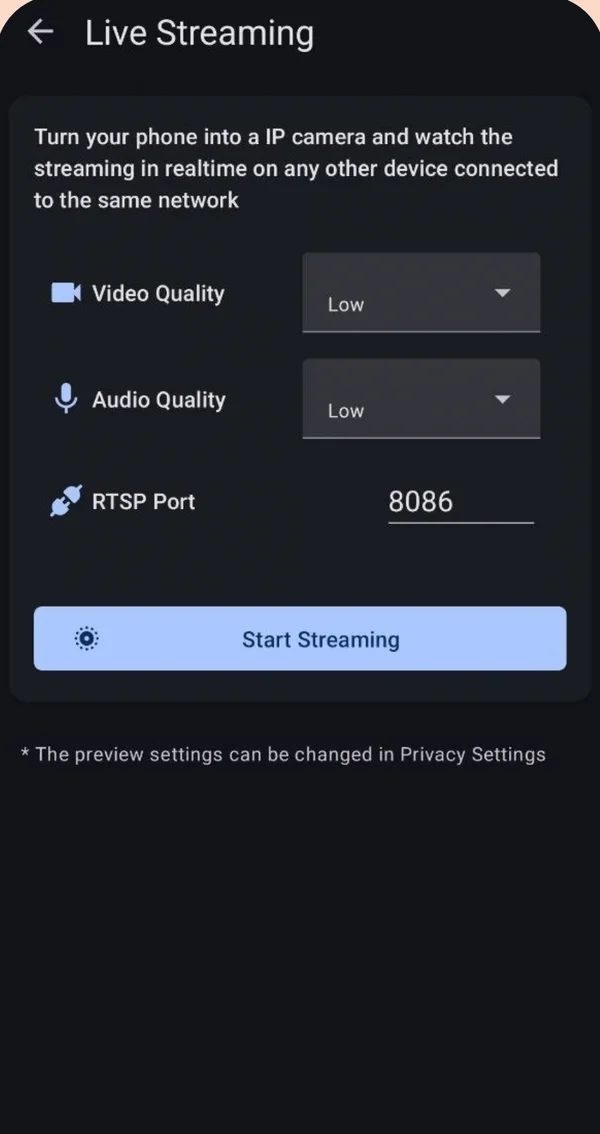
Install a recorder with local streaming on the old phone, keep it plugged in, and view it from another device on the same Wi-Fi. With XSCamera: Settings → Live Streaming → Start Streaming, then open the shown address (rtsp://phone-ip:8086) in VLC on your computer or other phone. To keep footage instead, use a scheduled recording.
Two ways to use it
| Live view | Record | |
|---|---|---|
| What it does | Streams the camera to another device now | Saves video on the old phone |
| In XSCamera | Settings → Live Streaming | Start Camera, or Schedulers |
| Needs | Both devices on the same Wi-Fi | Free storage |
| Best for | Checking a baby, pet or door from another room | Keeping a record while you are out |
Live view over your own Wi-Fi
- Prepare the old phone
Connect it to Wi-Fi, install XSCamera, allow the camera. Set battery use for XSCamera to Unrestricted (Settings → Apps → XSCamera → Battery). XSCamera has a shortcut for this under Settings → Battery Optimization. - Place it and plug it in
A cheap stand or a shelf works. Leave it on a charger. - Start streaming
Settings → Live Streaming. Choose video and audio quality, keep the RTSP port at 8086, tap Start Streaming. The screen shows an address such asrtsp://192.168.1.23:8086. - Open it on another device
In VLC: Media → Open Network Stream (computer) or New stream (phone), and enter that address. Any RTSP viewer works, including home-automation software that accepts RTSP cameras.
Recording instead of streaming
For a record of what happened, use Schedulers: set a start time and duration, for example every working day while you are out. Use 720p with H.265 to fit many hours. Turn on Timestamp so each frame shows the date and time.
Tips for a phone that stays on for days
- Remove the case and keep the phone out of the sun. Heat is what stops long sessions.
- If the phone offers a charge limit (80–85%), turn it on to protect the battery.
- Lower the screen brightness, or let the screen turn off. Streaming continues.
- Give the phone a fixed IP address in your router so the stream address does not change.
What it does not do
XSCamera has no motion detection, no alerts and no remote viewing over the internet. If you need notifications when something moves, or to check in from work, a dedicated security camera app or device is the right tool. If you want a simple camera that never sends video to someone else’s cloud, this setup does exactly that.
Where you may point it
Your own rooms and entrances are generally fine. Do not record bathrooms, guest bedrooms or a neighbour’s property, and tell people who live or work in your home. See the legal guide.
Questions people ask
Can I turn my old phone into a security camera for free?
Yes. With XSCamera the old phone streams over your Wi-Fi or records locally at no cost, with ads in the app. No subscription or account is needed.
Does the old phone need a SIM card?
No. It needs only Wi-Fi for live view, and not even that for local recording.
How do I use an Android phone as an IP camera?
Start Live Streaming in XSCamera and open the rtsp:// address it shows in an RTSP viewer such as VLC on the same network.
Can I watch it when I am away from home?
Not directly. The stream is local to your Wi-Fi. Remote access needs your own VPN into your home network, or a different, cloud-based camera app.
What is the RTSP address format?
rtsp://PHONE-IP:PORT, for example rtsp://192.168.1.23:8086. The port is 8086 unless you change it.