 XSCamera
Recording stops by itself? Fix it on your phone
When a background recording ends after a few minutes, the app has not crashed. Your phone’s battery manager has closed it. Here is the setting to change on each brand.
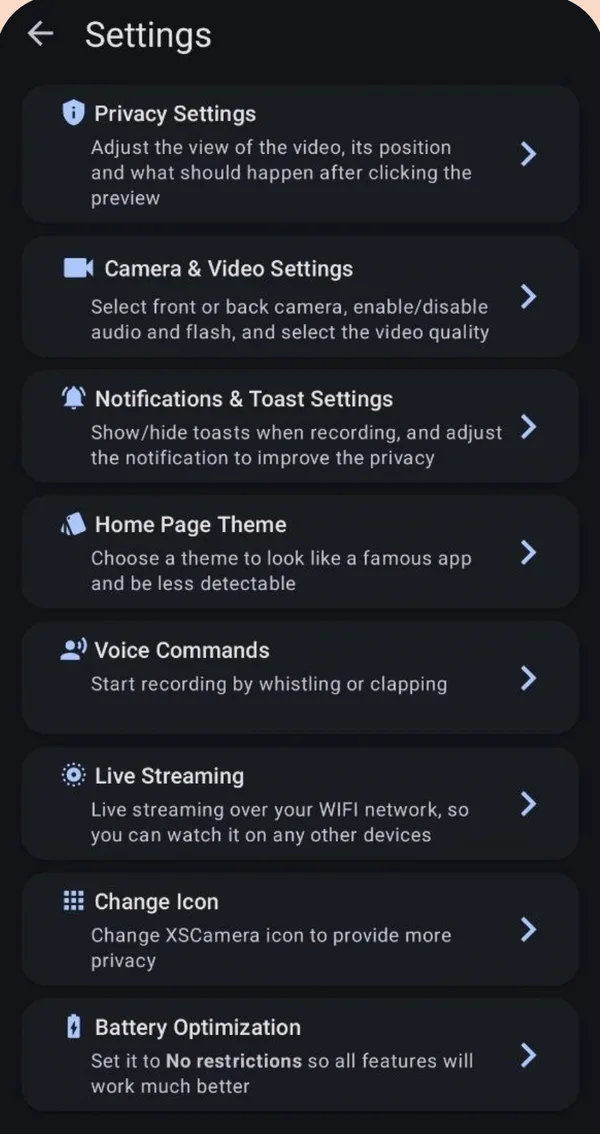
Set the recorder’s battery use to “Unrestricted” (or “Don’t optimize”). On most phones: Settings → Apps → XSCamera → Battery → Unrestricted. Xiaomi, Oppo, Vivo and Huawei phones also need autostart or background activity allowed. Then start a new recording.
Why it happens
Phone makers add their own battery savers on top of Android. They close apps that run for a long time with the screen off, even apps doing work you asked for. Recording is saved up to the moment the app is closed, so you find a short video instead of a long one.
The setting, brand by brand
Menu names change a little between versions. Look for the closest match.
| Phone | Where to go |
|---|---|
| Samsung (One UI) | Settings → Apps → XSCamera → Battery → Unrestricted. Also Settings → Battery → Background usage limits → remove XSCamera from Sleeping apps and add it to Never sleeping apps. |
| Google Pixel | Settings → Apps → XSCamera → App battery usage → Unrestricted. |
| Xiaomi, Redmi, POCO | Settings → Apps → Manage apps → XSCamera → Battery saver → No restrictions, and turn on Autostart. Lock the app in the recents screen. |
| OnePlus, Oppo, Realme | Settings → Battery → (More settings) → Optimize battery use → XSCamera → Don’t optimize. Allow background activity and auto-launch in the app’s battery page. |
| Vivo, iQOO | Settings → Battery → Background power consumption management → XSCamera → Don’t restrict. Allow autostart. |
| Huawei, Honor | Settings → Battery → App launch → XSCamera → Manage manually, with all three switches on. |
| Motorola, Nokia, Sony | Settings → Apps → XSCamera → Battery → Unrestricted. |
XSCamera opens the right page for you from Settings → Battery Optimization.
If it still stops
- Turn off the phone-wide power saving mode while recording.
- Check free storage. Recording ends when the phone is full. Use 720p or H.265 for longer sessions.
- Watch the heat. Phones stop the camera when they overheat, especially at 4K in a hot car. Lower the quality and keep the phone out of direct sun.
- Do not swipe the app away from recents on Xiaomi, Oppo or Vivo phones. That can end the service.
- Another app took the camera. A video call or a second camera app can interrupt recording.
Scheduled recordings that do not start
Schedules need the same battery settings, plus the Alarms & reminders permission on Android 12 and newer so the start time is exact. Some heavily customized phones still delay alarms in deep sleep. Keeping the phone on a charger avoids that.
Questions people ask
Why does my video recording stop when the screen turns off?
With the stock camera, that is normal behaviour. With a background recorder, it means battery optimization closed the app. Set the app to Unrestricted.
Is the video lost when the app is closed?
No. XSCamera saves what was recorded up to that point. Open Records to find it.
Does Unrestricted drain my battery all the time?
No. It only allows the app to keep running when you start a recording. XSCamera does nothing in the background otherwise.
Which phones are hardest on background apps?
Xiaomi, Oppo, Vivo, OnePlus and Huawei have the most aggressive battery managers. Pixels and Motorola phones are the most lenient.