 XSCamera
How to use your phone as a dashcam
An Android phone, new or old, makes a workable dash camera for free. Here is the setup that works, and where a real dashcam is still better.
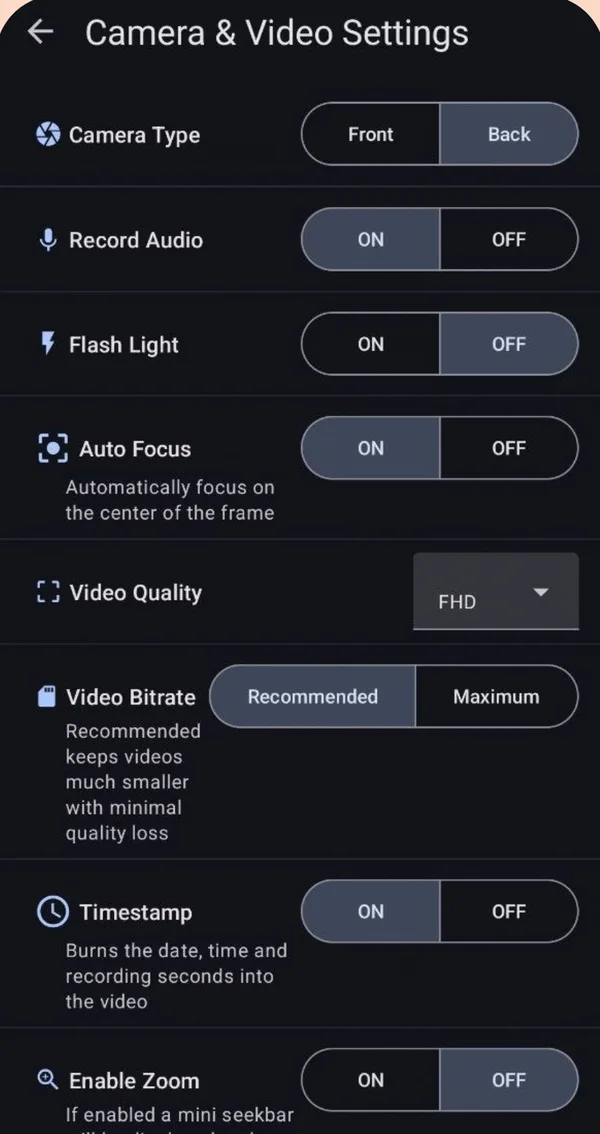
Yes, you can use a phone as a dashcam. Mount it behind the windshield with the back camera facing the road, plug it into a car charger, and record with a background video recorder such as XSCamera so the screen can stay off or show navigation. Use 1080p, H.265 and the date-time stamp. An old phone without a SIM works fine.
What you need
- An Android phone on version 7.0 or newer. An old one in a drawer is ideal.
- A sturdy windshield or dashboard mount that leaves the back lens uncovered.
- A car charger and cable. Do not rely on the battery.
- A background video recorder. XSCamera is free.
Setup
- Mount it high and central
Behind the mirror is best: wide view, out of your sight line, shaded. - Plug in
Route the cable so it does not hang near the pedals or gear lever. - Settings in XSCamera
Back camera · FHD · H.265 · Landscape · Timestamp on. Audio is your choice. Set battery use for XSCamera to Unrestricted (Settings → Apps → XSCamera → Battery). XSCamera has a shortcut for this under Settings → Battery Optimization. - Start before you move
Tap Start Camera, then turn off the screen or switch to your navigation app. Never operate the phone while driving.
How much storage it uses
| Setting | Roughly per hour | Good for |
|---|---|---|
| 720p, H.265 | about 1 GB | Long trips, small storage |
| 1080p, H.265 | 2–3 GB | Best balance; plates readable at close range |
| 1080p, H.264 | 4–6 GB | Older phones without H.265 |
| 4K | 12 GB or more | Short drives only; runs hot |
These are estimates. XSCamera shows the estimated recording time for your phone and settings before you start.
Honest limits against a real dashcam
- No loop recording. A dashcam overwrites its oldest clips. XSCamera does not, so delete old recordings when storage runs low.
- No crash detection or parking mode. You start and stop it yourself, or with a schedule.
- Heat. A phone in direct sun on a charger can overheat and stop the camera. Use 1080p rather than 4K and keep it shaded.
- Field of view. Phone main cameras are narrower than dashcam lenses. Use the wide lens if your phone offers it.
If you drive daily and want set-and-forget, buy a dashcam. For occasional trips, a rental car, or giving an old phone a job, the phone works well.
Is it legal?
Dashcams are legal in most countries, with rules on where the device sits on the windshield and, in some places, on recording audio of passengers or publishing footage. Several European countries restrict how footage is used. Check local rules, and tell passengers if you record sound.
Questions people ask
Can I use an old phone as a dash cam?
Yes. It does not need a SIM or mobile data. It needs Android 7.0 or newer, a working back camera, power and free storage.
What is the best app to use a phone as a dashcam?
For plain continuous recording with the screen off, a background video recorder such as XSCamera is enough. If you need loop recording or automatic crash clips, choose a dedicated dashcam app or device.
Can I use navigation and record at the same time?
Yes. Start recording in XSCamera, then open your maps app. Recording continues in the background.
Is it legal to record video while driving?
Recording the road with a mounted device is legal in most places. Holding or operating the phone while driving is not. Local rules on placement and audio differ.
Will dashcam footage have the date and time?
Yes if you turn on Timestamp. XSCamera burns the date, time and elapsed seconds into the video.